# project / resource access audit
AZURE RBAC · RESOURCE GRAPH · PIM · LEAST PRIVILEGE
The Privilege Audit
One account had Owner assignments everywhere I looked. Another account was gone, but its Reader assignment remained. I followed the access trail.
The short version
The first clue was repetition. One account appeared throughout the Azure role-assignment export with Owner privileges. A second finding pointed in the opposite direction: an account had been deleted, but its Reader assignment was still there.
I followed those access records through Azure CLI, Resource Graph, and Privileged Identity Management. The final stage took the audit into a resource group outside my initial view, where I examined an Owner assignment and the condition attached to it.
This was a completed five-stage Mad Hat Labs exercise in a live training tenant. My role was to investigate and document Azure resource access. The deliverable was an audit with findings, scope limitations, and proposed remediation—not a claim that I changed or secured a production tenant.
A useful access audit has to connect the principal, the role, the scope, and the conditions under which the permission can be used.
1. The baseline: too many Owner assignments
I began with the instructor-provided IAM CSV. One user appeared repeatedly with Owner assignments, including a subscription-level grant identified by the lab and further grants across resource scopes. Several visible entries described persistent management access.
The repetition made the account a priority for least-privilege review. The full export was the working evidence; the screenshot’s truncated scope column does not support an exact count of distinct affected resources.
The cleanup question is more subtle than removing a few duplicate rows. An explicit child-scope assignment can remain after a parent assignment is removed. Conversely, removing child assignments may leave the account’s broader inherited access unchanged. I would review those grants together against the account’s actual responsibilities.

2. The orphan: deletion did not clean up the assignment
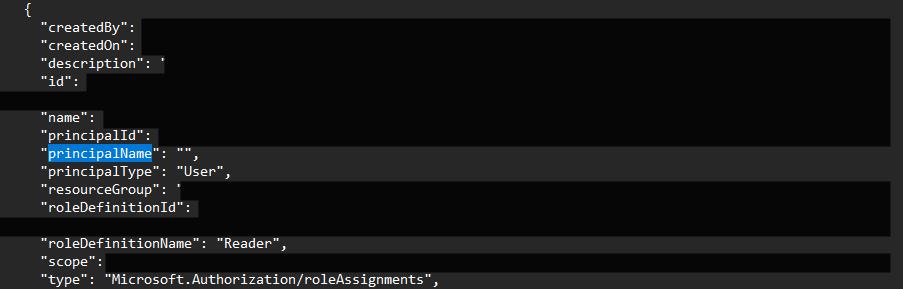
I ran a resource-group query in Azure CLI from a PowerShell session in Cloud Shell, then compared the output with the supplied JSON export. The published command replaces the actual resource-group name:
az role assignment list --resource-group "<RESOURCE-GROUP>"The relevant JSON record retained a principal ID and resource-group
scope. Its principalName was empty, its
principalType was User, and its assigned role
was Reader. The lab explanation identified it as an
account that had been deleted without removing the assignment.
The comparison mattered because my restricted account could also encounter missing names during directory lookups. A blank name in my own command output was not enough to classify an identity as deleted. The supplied export and scenario context distinguished the intended orphaned record from that visibility limitation.
This was an assignment-lifecycle finding. The record did not establish that the deleted account could still authenticate or that an attacker had used it. In an operational audit, I would confirm the object’s lifecycle status before approving removal. Microsoft also documents replication delays as a possible cause of unresolved identity names. Reference
3. Resource Graph: turning records into a searchable inventory
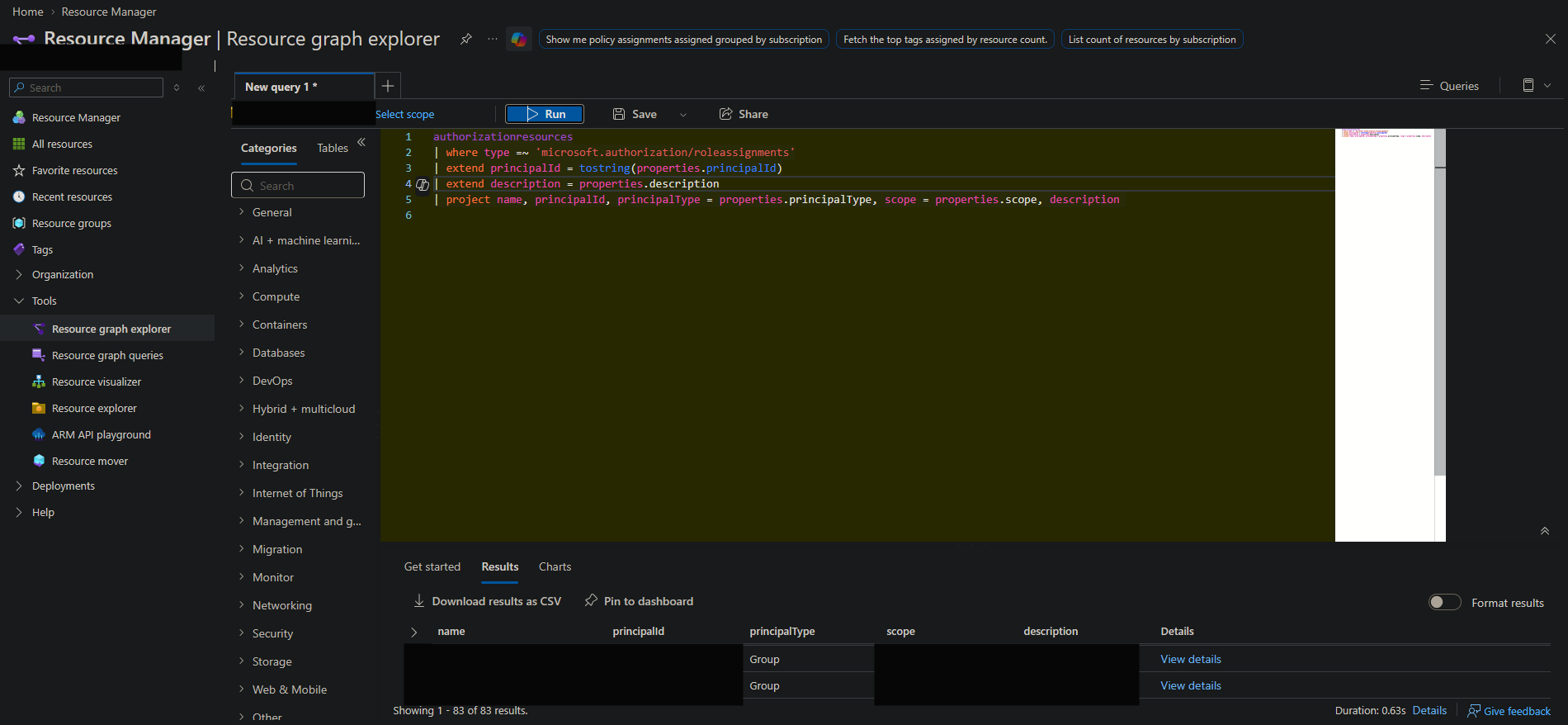
I moved to Azure Resource Graph Explorer and queried
authorizationresources. The preserved screenshot shows an
inventory query restricted to role-assignment records, projecting
principal ID, principal type, scope, and description. It returned
83 records in the accessible query scope.
That screenshot has no principal-ID filter. The 83 records are therefore the broad inventory result—not 83 orphaned assignments. For the targeted lab stage, I carried forward the orphaned principal ID; the lab review records the accepted identifier. The targeted result count was not preserved in this screenshot.
The corrected query pattern for that pivot is:
authorizationresources
| where type =~ 'microsoft.authorization/roleassignments'
| extend principalId = tostring(properties.principalId)
| extend description = properties.description
| where principalId == '<REDACTED-PRINCIPAL-ID>'
| project name, principalId,
          principalType = properties.principalType,
          scope = properties.scope, description
Resource Graph can query across multiple accessible subscriptions. It does not bypass RBAC, and a directory-level selection does not grant tenant-wide visibility. I treated the results as evidence about the scopes the account could inspect, rather than proof that inaccessible areas were clear. Reference
4. PIM: eligibility is another part of the access picture
The earlier stages focused on ordinary active role assignments. PIM added the distinction between access that was already active and access available for activation.
I reviewed the resource-group assignment export, which included assignment state, direct or inherited membership, duration, and resolved-name context. The account needed for the fourth-stage clue appeared with a direct, permanent Reader assignment. Its name was the clue; the role record defined its permission. Nothing in that excerpt demonstrated disabled MFA, absent approval, or a specific activation-policy defect.
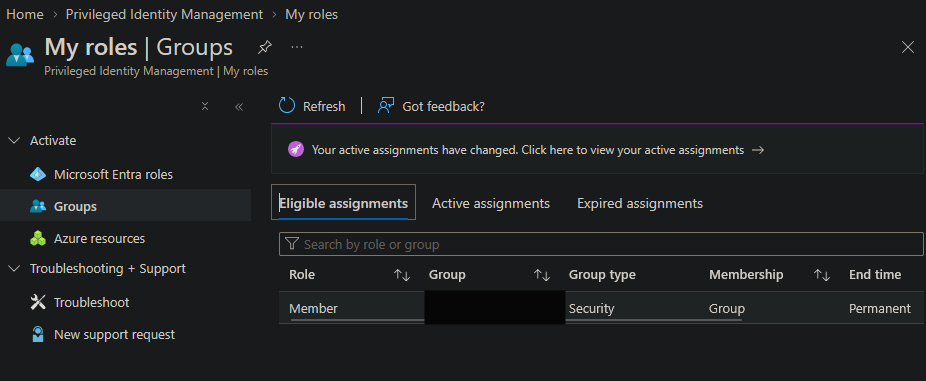
The later PIM capture showed an eligible Member assignment under My roles → Groups. That is group-membership eligibility, a distinction worth preserving when explaining how the audit account obtained access. The capture alone does not enumerate the group’s complete resource entitlements.
For Azure resource roles, the PowerShell commands covered in the exercise query eligibility and assignment schedules separately:
Get-AzRoleEligibilitySchedule -Scope "<AZURE-RESOURCE-SCOPE>"
Get-AzRoleAssignmentSchedule -Scope "<AZURE-RESOURCE-SCOPE>"
These are documented query examples, not additional captured command executions. Eligibility requires activation before use; active access can be permanent or time-bound. Just-in-time access limits when a privilege is available. The role and scope still need to be appropriate. Reference
5. The final scope: audit access and Owner access were different
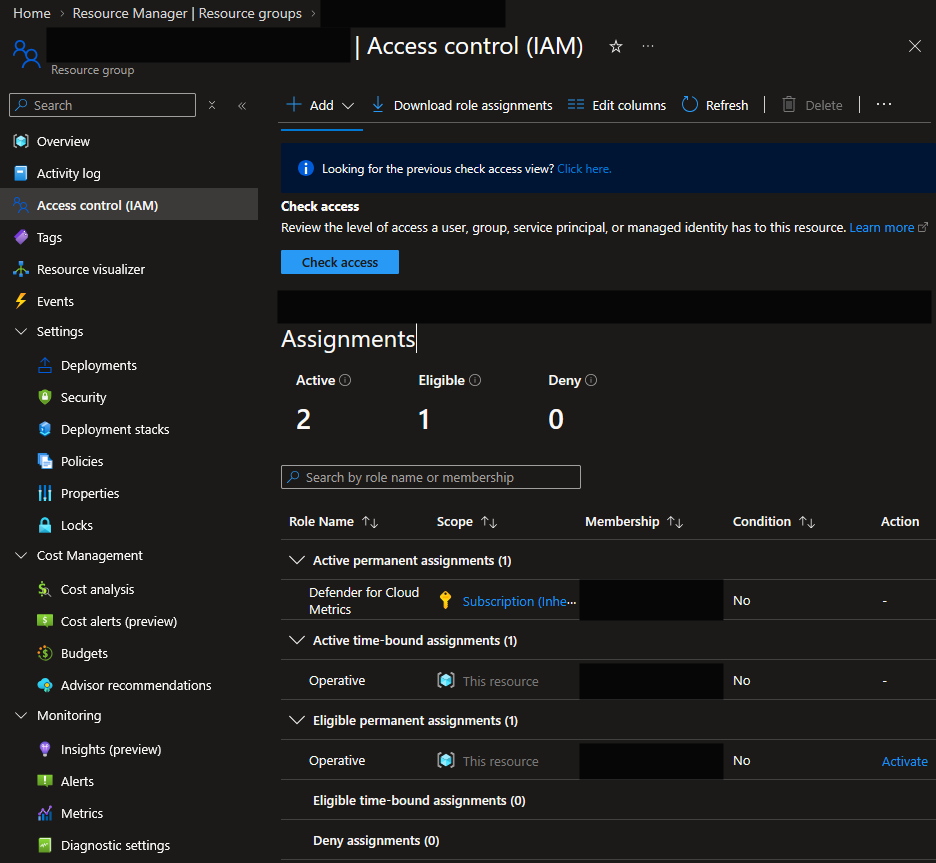
I used the lab’s authorized activation path to continue into the additional resource group. The resulting Check access view showed two active assignments and one eligible assignment for my audit account. The expanded rows included an active, time-bound custom Operative assignment at “This resource,” alongside an eligible Operative assignment and an inherited permanent assignment.
That evidence supports temporary resource access. It does not show that I activated Owner, and I do not describe it that way.
The accompanying resource-group export contained the Owner assignment used to complete the hunt. It also carried a version 2.0 condition referencing role-assignment write and delete operations and a set of privileged role definitions.
That condition is material. An Owner label should not automatically be described as unrestricted access delegation when the assignment contains a relevant condition. The condition shown limits the matching role-assignment operations; it is not evidence that all resource-management authority has been reduced to a narrow operational role. The role, scope, and condition need to be evaluated together. Reference

The exercise was complete when the final finding was recovered. The outcome was an access audit, with the Owner finding documented in its actual context.
Recommendations and how I would verify them
Remediation was outside the completed lab work. I would use the following criteria to make corrective work measurable:
| Recommendation | Evidence required for closure |
|---|---|
| Review repeated Owner grants together | Full parent and child scopes mapped to a documented business requirement; unnecessary explicit grants removed without assuming inheritance disappeared |
| Remove confirmed obsolete assignments | Deleted-object status verified and the exact assignment absent from fresh listings across the reviewed scopes |
| Reduce unnecessary resource-management privilege | A suitable replacement role and scope approved; required work succeeds and an authorized test shows unnecessary capabilities are unavailable |
| Review conditions and equivalent access | Role-assignment conditions, direct grants, inherited grants, group membership, and PIM eligibility checked for remaining equivalent authority |
| Validate the intended activation controls | Relevant role/group settings and activation records demonstrate the required duration, authentication, and approval behavior |
| Make the audit repeatable | A retained baseline, defined scope, named reviewer, and recurring review cadence |
After a change, I would allow for propagation and refresh the access context before validating the result. Removing one visible row is not sufficient if another assignment still grants the same capability.
What I would carry into a real engagement
The value of the exercise was the chain of reasoning. The CSV exposed a pattern, the CLI and JSON comparison clarified an unresolved identity, Resource Graph made the inventory searchable, and PIM explained access states that an ordinary assignment list did not fully describe.
The final export added another lesson: a role’s name is the beginning of the analysis. The scope, inheritance, activation state, and assignment condition determine how that role should be interpreted.
I completed all five stages and documented the evidence without turning missing screenshots or restricted visibility into stronger claims. That is the approach I would use in an IAM engagement: identify what the account can do, explain why, and define how a proposed correction would be verified.
Skills demonstrated: Azure resource RBAC, IAM export analysis, Azure CLI, principal-ID correlation, Resource Graph/KQL, PIM eligibility and active-state review, assignment-condition analysis, and least-privilege validation planning.
Lab credit: Mad Hat Labs, Chapter 3.5, “Privilege Audit.” Public screenshots are flattened redacted copies. Flags, answers, lab identities, timestamps, and exact environment identifiers are withheld.